Cover faces and personal details in video, on your own computer
Beat2Cut Redact is a desktop app for video redaction: it finds faces by itself, follows anything you mark, and lets you check every covered object on a timeline before you export. Your video is not uploaded.
The first release is for Mac with Apple silicon. A Windows version is in preparation.
What it does
Finds faces by itself
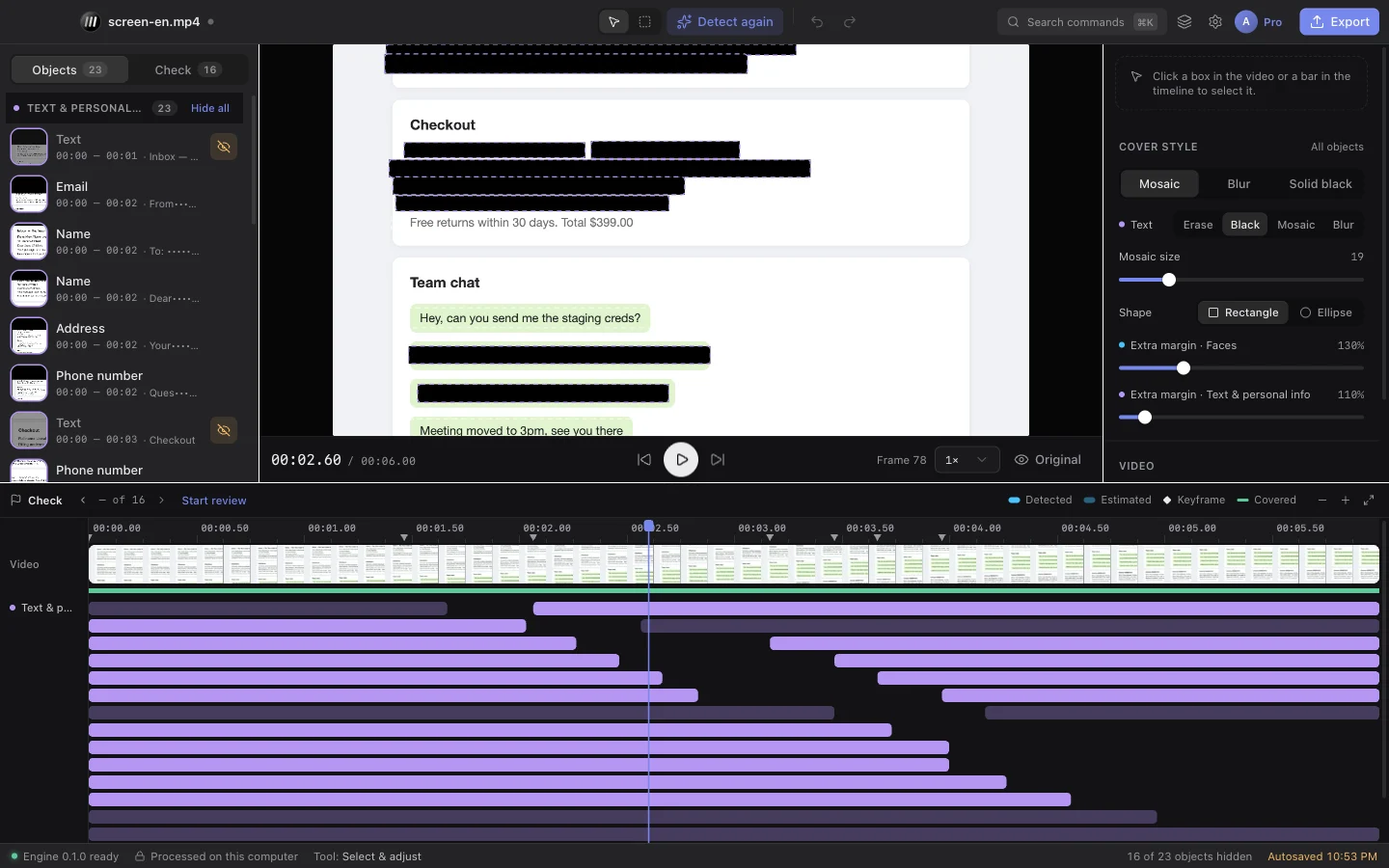
Faces are detected and followed through the whole video. License plates and on-screen text such as names, email addresses, phone numbers and card numbers are in beta.
Follows what you mark
Draw a box around anything else, such as a logo, a document or a screen, and the app follows it forward and backward through the shot.
Review by object, not by frame
Every covered object is one row on the timeline. Step through them, fix a miss with a keyframe, or hide the ones that do not need covering.
Covers that hold up
Mosaic, blur, solid black or erase, as a rectangle or an ellipse. For text the app recommends solid covers, because blurred text can sometimes be recovered.
Exports for where you work
A finished video with the covers burned in, a transparent overlay to place over the original in your editing software, or a black-and-white matte.
Stays on your computer
Detection and export run on your machine and the video is not uploaded. After you sign in, the app keeps working offline for up to 72 hours at a time.
How it works
- 01
Open a video
Open a file from your disk. Nothing is sent anywhere.
- 02
Detect, then check
Choose what to look for and let the app find it. Go through the list, add what was missed and remove what should stay visible.
- 03
Export
Save the covered video, or an overlay or matte for your editing software. Several videos can be processed in one batch.
Who can use it
Beat2Cut Redact is part of Beat2Cut Pro: one subscription covers the website and the desktop app, on up to 3 computers, with no credits spent in the desktop app.
With a Free account you can open the built-in demo and try reviewing and adjusting covers. Opening your own videos needs Pro.
Questions
- Is my video uploaded when I redact it?
- No. Beat2Cut Redact is a desktop app: detection, tracking and export all run on your own computer, and the video file stays there. The app contacts Beat2Cut only to sign you in and to confirm your Pro subscription, and it keeps working offline for up to 72 hours at a time.
- What can Beat2Cut Redact detect by itself?
- Faces are detected automatically and followed through each shot. License plates and on-screen text, such as names, email addresses, phone numbers, addresses and card numbers in screen recordings, are available in beta. Anything else can be covered by drawing a box, which the app then follows.
- Which computers does it run on?
- The first release is for Mac computers with Apple silicon, on macOS 12 or later. A version for Windows 10 and 11 is in preparation. The interface is available in English, Chinese, Japanese, Korean, German, French and Spanish.
- How do I get Beat2Cut Redact?
- It will be included with Beat2Cut Pro at no extra cost, for up to 3 computers per account. The download will appear on this page when the first release is out. Until then you can subscribe to Pro on the website and use every browser tool.
- Does the desktop app use credits?
- No. Credits are used on the website for things like AI voiceover. In the desktop app, detection and export are unlimited for Pro subscribers and are not counted in credits.