Video scene detection and timeline split points
Find hard cuts and scene changes in the browser, review them on the timeline, then split or export a cut list. 5 credits a run from 150 free credits.
- Runs entirely in your browser without uploading
- 5 credits a run on Free, from your 150 one-time free credits; Pro detects without limit. Sign in required.
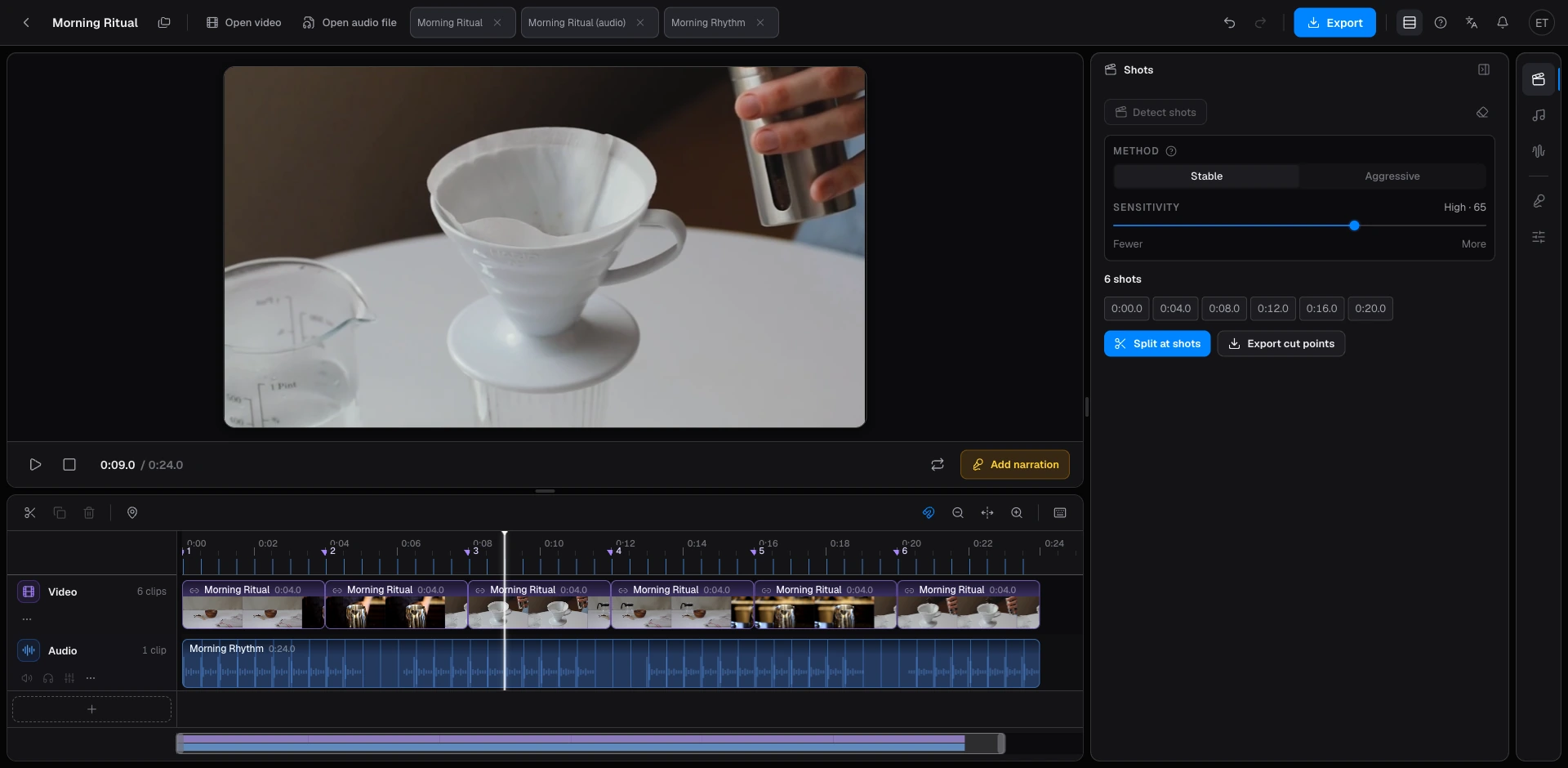
- Stable and Aggressive modes, with a sensitivity slider, to catch hard cuts or ignore small camera moves.
- Click each detected cut on the timeline before you split anything.
- Export FCPXML, Premiere XML, Resolve EDL, or CSV after review. 5 credits a delivery on Free once shots are included.
Beat2Cut finds where the picture changes (a hard cut, a transition, or a new shot) and places those points on a browser timeline. Sign in with a free account. Detection costs 5 credits a run on Free, from 150 one-time free credits, and is unlimited on Pro. The video file stays on your device.
Two modes. Stable ignores small lighting shifts and camera movement, and fits interviews, vlogs, and documentaries. Aggressive is more sensitive to hard cuts and fits music videos, action, and fast edits. A sensitivity slider changes how many cuts you get. Re-running with a new setting uses another 5 credits on Free.
Each detected cut is a row you can click. The playhead jumps to that frame so you can keep or drop it. Nothing splits until you choose to. After review, split the picture track or export FCPXML, Premiere XML, Resolve EDL, or CSV. A cut list that includes shots costs 5 credits on Free and is included with Pro. Beat-only lists stay free.
Every frame is decoded in order in a background worker, so a cut late in a long video is found as reliably as one at the start. Each frame is compared with its neighbours rather than against a fixed threshold, which keeps fade-ins and slow dissolves from turning into a burst of false cuts. Files up to 2 GB are accepted. MP4, MOV, WebM, and M4V are the supported video containers.
Free accounts get 150 one-time credits at sign-up; they do not refill once spent. Scene detection and silence detection cost 5 credits a run, and media probe, loudness, and contact sheet cost 2 credits a check. Cut lists that include shots, plus SRT/VTT, chapters, and WAV/MP3 mixdown, cost 5 credits a delivery. A finished MP4 or per-shot ZIP costs 10. Pro includes all of those. AI narration and script translation use credits on every plan.
Open Studio, drop in a video, and open the Shots rail. Pick Stable or Aggressive, set sensitivity, and run detection. Click each cut to confirm it, then split the track or export a cut list. Load the sample project if you want to see the markers before using your own file.
Scene detection isolates picture cuts. You can also run beat detection on the soundtrack and snap those shots to the music, or run silence detection to tighten a talking-head recording. Each result is a checklist on the same timeline, so you review before anything is deleted or split.
Stable is the default for most footage. Switch to Aggressive when real cuts are being missed on a fast-cut source. If pans and flashes are being flagged as new shots, lower sensitivity or go back to Stable and run again. Each run spends 5 credits on Free, so confirm the mode before you start.
When you finish elsewhere, export the cut points instead of an MP4 so the original picture is not re-encoded. Final Cut opens FCPXML, Premiere opens XML, Resolve opens EDL, and CSV is a plain table. A delivery that includes shots costs 5 credits on Free and is included with Pro. Beat detection stays free on every plan.
Detect scenes and export a cut list
- 01Open Studio and drop in a video, or load the demo project.
- 02Open the Shots rail and run scene detection.
- 03Click each cut to confirm it, then split or export a cut list.
- 04Open the file in Final Cut, Premiere, or Resolve if you need to polish.
Questions
- How do I review scene cuts before splitting the clip?
- Each detected cut becomes a row. Click it to jump the playhead, watch the frame, then keep or drop that cut. Nothing is split until you say so, so false hits from pans or flashes can be removed first.
- Does scene detection work on long videos?
- Yes. Every frame is decoded in order, so a cut near the end of a 30-minute video is found the same way as one near the start. Longer files simply take longer. Each run costs 5 credits on Free, whatever the length.
- Which file should I export after scene detection?
- If you finish in Final Cut, Premiere, or Resolve, export the matching cut list (FCPXML, XML, EDL, or CSV). That delivery costs 5 credits on Free once shots are included, and is included with Pro. Export MP4 only when you want a finished movie from the browser.
- Does scene detection upload my video?
- No. Frames are read locally and cut-list export is local too. The only things that talk to a server are AI narration, script translation, and the credit settlement for detection, deliveries and MP4. The settlement carries no media.