Audio beat detection, BPM readout, and a snap grid on the timeline
Find beats in a song or a mixed soundtrack in the browser. Detection is free with no sign-up; exporting a beat-only cut list is free after a free sign-in.
- Runs entirely in your browser without uploading
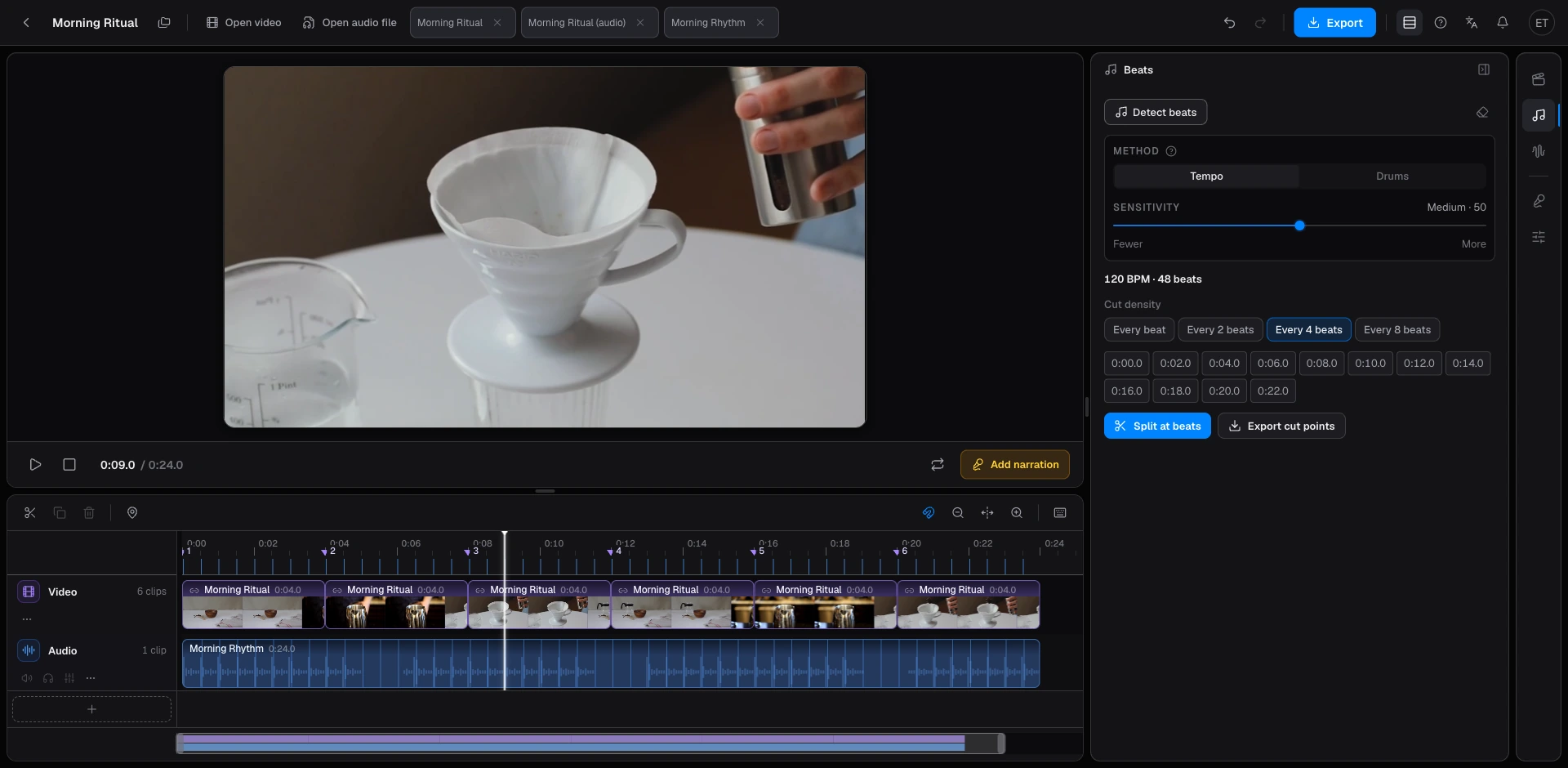
- Two modes: Music Tempo for steady songs, Drum Beat for kick-heavy tracks. BPM is shown after the run.
- Markers land on the timeline ruler. Clips snap to them as you drag.
- Beat-only cut lists export as FCPXML, Premiere XML, Resolve EDL, or CSV at no credit cost.
Beat2Cut finds the beats in a music track or a video soundtrack and places them as markers on a browser timeline. Detection is free and needs no sign-up. Exporting a cut list that holds only those beats is free too; it needs a free account. The audio file stays on your device.
Two modes cover different music. Music Tempo follows a steady pulse and fits pop, rock, and most electronic tracks. Drum Beat follows the kick and bass hits in EDM, hip-hop, and trap. After a run you see a BPM readout and a row of markers under the ruler. Keep every beat, or step the grid to every 2, 4, or 8 beats. On a 4/4 track, a 4-beat step is one bar, so cuts land on downbeats instead of every kick.
Markers are snap targets, not a finished edit. With snapping on, a clip you drag locks to the nearest beat, so picture cuts land in time without nudging frame by frame. If you finish in another editor, export the markers as Final Cut Pro FCPXML, Premiere XML, DaVinci Resolve EDL, or CSV. That file becomes a marker track in the desktop timeline. Beat-only lists cost nothing on any plan. A list that also includes detected shots costs 5 credits on Free and is included with Pro.
Detection runs in the browser. Open an audio file (MP3, WAV, M4A, AAC, FLAC, or OGG) or a video that already has the music mixed in. A sensitivity slider changes how many markers you get: lower for main beats only, higher if quiet hits are being skipped. Re-running detection does not use credits. Switching between Music Tempo and Drum Beat does not use credits either.
Beat detection is the only tool you can run without signing in; every other tool, and every export, needs a free account so credits can be tracked. Beat detection and beat-only cut lists are the only capabilities that never touch the balance. On Free, scene and silence detection cost 5 credits a run, and media probe, loudness check, and contact sheet cost 2 credits a check. Cut lists that include shots, plus SRT/VTT, chapters, and WAV/MP3 mixdown, cost 5 credits a delivery; a finished MP4 or per-shot ZIP costs 10. Pro includes all of those. AI narration and script translation use credits on every plan, Pro included.
Open Studio, drop in the song or the mixed video, and open the Beats rail. Pick a mode, run detection, then choose every beat or every bar. Drag footage onto the timeline and let snapping place the cuts. If you are new to the layout, load the sample project first so you can see the grid before using your own file. Export the markers when the pulse looks right, or keep cutting in the browser.
This is a beat grid and a rough-cut timeline. It is not a stem splitter and it does not replace a desktop editor. It answers where the pulse is, lets you cut to that pulse, and hands the same markers to Premiere, Resolve, or Final Cut. Color, effects, multi-cam, and a full mix stay in those apps after you export.
Accuracy follows how clear the rhythm is. A click track or a four-on-the-floor kick usually lands on the first pass. A rubato piano piece or a recording with a lot of crowd noise may need a mode switch or a sensitivity change. If the grid is too dense, step to every 4 or 8 beats instead of deleting markers one by one. If downbeats are missing, raise sensitivity and run again. Each run is still free.
Use it for music videos, short videos that cut on the downbeat, and talking-head edits that sit on a music bed. Editors who already work in Final Cut often export FCPXML instead of tapping markers by hand. Premiere takes XML; Resolve takes EDL. Keep the source audio on the device when the track is unreleased. Sign in once; after that, beat detection stays unlimited.
Find beats and snap or export
- 01Open the song or a video that already has the music mixed in.
- 02Open the Beats rail and run detection.
- 03Pick every beat or every bar, then snap clips to the grid.
- 04Or export markers for Premiere, Resolve, or Final Cut.
Questions
- How do I get beat markers into Premiere, Resolve, or Final Cut?
- Export a beat-only cut list as Premiere XML, Resolve EDL, FCPXML, or CSV. That export is free on every plan; it needs a free account. Open the file in the desktop editor and the pulse becomes a marker track you can cut against.
- How do I cut on bars instead of every beat?
- After detection, set the snap interval to every 2, 4, or 8 beats. On a 4/4 track, every 4 beats is one bar. Clips then snap to downbeats instead of every kick.
- Does the Detect beats button use credits?
- No. Beat detection is unlimited and free, even before you sign in, and exporting a list that holds only beats is free after a free sign-in. Credits apply when you run scene or silence detection, deliver a list that includes shots, export MP4, or generate AI narration.
- Can I snap clips to the beats on the Beat2Cut timeline?
- Yes. Markers sit on the ruler. With snapping on, a clip you drag locks to the nearest beat, so you can rough-cut in the browser and export the same markers if you finish in another editor.