Remove dead air and silent pauses automatically
Detect pauses and hesitation gaps across talking-head or podcast footage. Audition candidates and ripple-delete them in one pass with zero upload.
- Runs entirely in your browser without uploading
- 5 credits a run on Free, from your 150 one-time free credits; Pro has no limit. Sign in required.
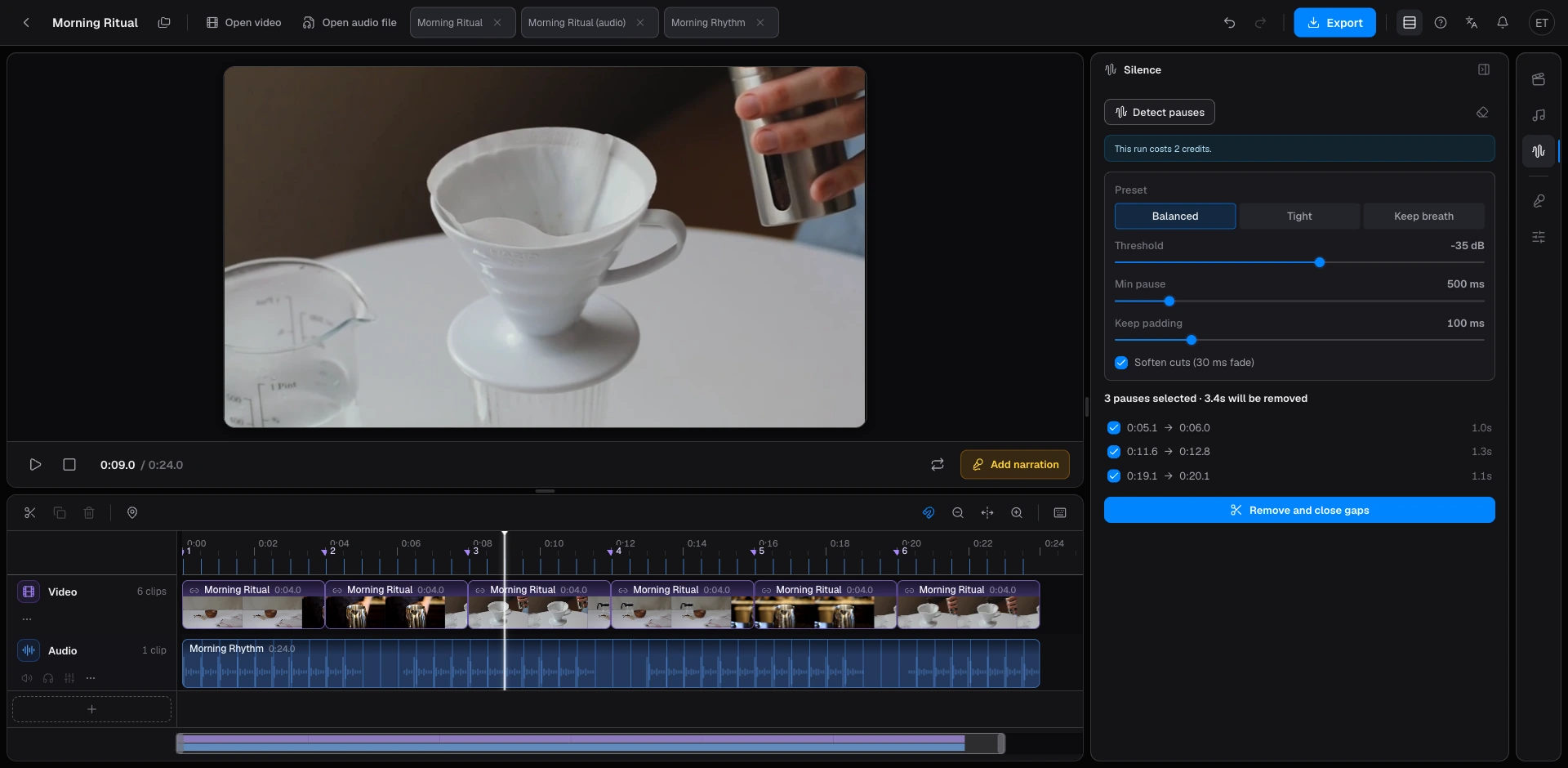
- Configure dB noise floor threshold, minimum pause duration, and safety padding buffers before committing cuts.
- Audition detected pauses individually and uncheck intentional dramatic pauses or natural breaths.
- Synchronized multi-track ripple deletion removes dead air in a single pass with full undo safety.
Silence remover analyzes your dialogue, interview, or podcast audio to locate every dead pause and awkward breath, generating an interactive candidate cut list on your timeline. Review candidate cuts with waveform previews, uncheck dramatic pauses or natural breaths you want to keep, and perform a multi-track ripple delete in a single click that closes every gap in sync. Each run costs 5 credits on Free (from your 150 one-time free credits) and is included with Pro. Your source media stays in your browser.
An interactive review list is the hallmark of professional non-linear editing. Naive automated silence removers aggressively slice audio on energy drops, frequently destroying deliberate dramatic pauses, comedic timing, or natural breaths between sentences. Beat2Cut tags every quiet interval with precise SMPTE timestamps and duration metrics. You can audition each row independently, uncheck any speech cadence you wish to preserve, and execute the final ripple edit with total peace of mind.
Batch deletions are backed by unified atomic undo protection. Even when eliminating dozens of dead pauses across a half-hour interview, the operation registers as a single unified timeline state. Hitting undo cleanly restores all audio and video tracks to their exact original positions. To avoid audible pops, digital clicks, or harsh cutoffs at speech boundaries, the engine applies customizable micro-fade edge transitions for a silky-smooth conversational flow.
Billing is simple. Silence detection costs 5 credits a run on Free, drawn from the 150 one-time free credits every account gets; Pro includes every run. Audio beat detection and beat-only cut lists are always free, and scene detection is priced the same as silence detection.
Every silence deletion executes a synchronized multi-track ripple cut. As dead air is removed from the dialogue track, overlying video clips, B-roll cutaways, and synchronous secondary audio tracks ripple backward together in lockstep. This prevents dreaded out-of-sync audio or accidental black flash frames. If you merely want to attenuate ambient room noise without altering video timing, consider track gain adjustment rather than temporal deletion.
The rough-cut workflow is lightning-fast and intuitive. Open your dialogue clip in Beat2Cut Studio or explore the built-in sample project, then open the Silence panel on the right rail. Adjust your decibel energy threshold (such as −35 dBFS) and minimum pause duration (such as 400 ms) to match the speaker's vocal pace. Click detect, audition highlighted candidates, and execute the cut or export an XML/EDL cut list directly to your favorite NLE.
Silence detection focuses specifically on physical acoustic amplitude rather than speech transcription. It isolates zero-energy voids and quiet stretches without attempting destructive speech-to-text tampering. This lightweight design allows our browser-native audio engine to process extended multi-gigabyte recordings in seconds without uploading private, sensitive client recordings to third-party cloud servers.
Customizable parameter controls allow you to adapt seamlessly to diverse acoustic environments. Remote podcast recordings or Zoom interviews often suffer from continuous room HVAC hum or mic preamp noise. Raising the dBFS threshold separates actual conversational pauses from steady room background noise, while tuning minimum duration lets you differentiate brief respiratory breaths from long mental hesitation blocks.
After performing a ripple deletion, play through the revised timeline once to evaluate overall speech momentum. If consecutive lines feel slightly cramped or an emotional reaction requires more breathing room, simply undo, toggle the specific pause row, and reapply. Alternatively, export the detected cut points as an FCPXML, Premiere XML, or DaVinci Resolve EDL list to complete final audio mastering in your dedicated post-production suite.
Find pauses, review them, then cut
- 01Open a talking-head or podcast file in Studio.
- 02Open the Silence rail and run detection.
- 03Listen to each pause and uncheck any you want to keep.
- 04Remove the rest in one pass, then export if you finish elsewhere.
Questions
- Why a checklist instead of deleting silence immediately?
- Immediate delete also removes breaths and jokes you meant to keep. The list lets you uncheck a pause, then cut the rest in one undoable pass.
- When does silence detection cost credits?
- Each run costs 5 credits on Free, from your 150 one-time free credits, so a Free account covers about 30 runs. Pro has no limit.
- Can I keep a pause I actually want?
- Yes. Uncheck that row. The commit only removes the still-checked ranges and closes the gaps.
- Does the cut move picture and music as well?
- Yes. It is a ripple across every track, so the picture stays in sync with the shortened voice.