Blur names, emails and card numbers in a screen recording
Yes, in beta, and the video is not uploaded: Beat2Cut Desktop finds names and card numbers in a recording on your computer. It is free to download; using it on your own videos needs Beat2Cut Pro ($20 a month), and monthly Pro starts with 7 days free.
Free to download. Using it on your own videos needs Beat2Cut Pro; monthly Pro starts with 7 days free (add a payment method to start; cancel before the 7 days end and you pay nothing). Without Pro the app opens its built-in demo.
For Mac with Apple silicon (macOS 12 or later) and Windows 10 or 11 (64-bit).
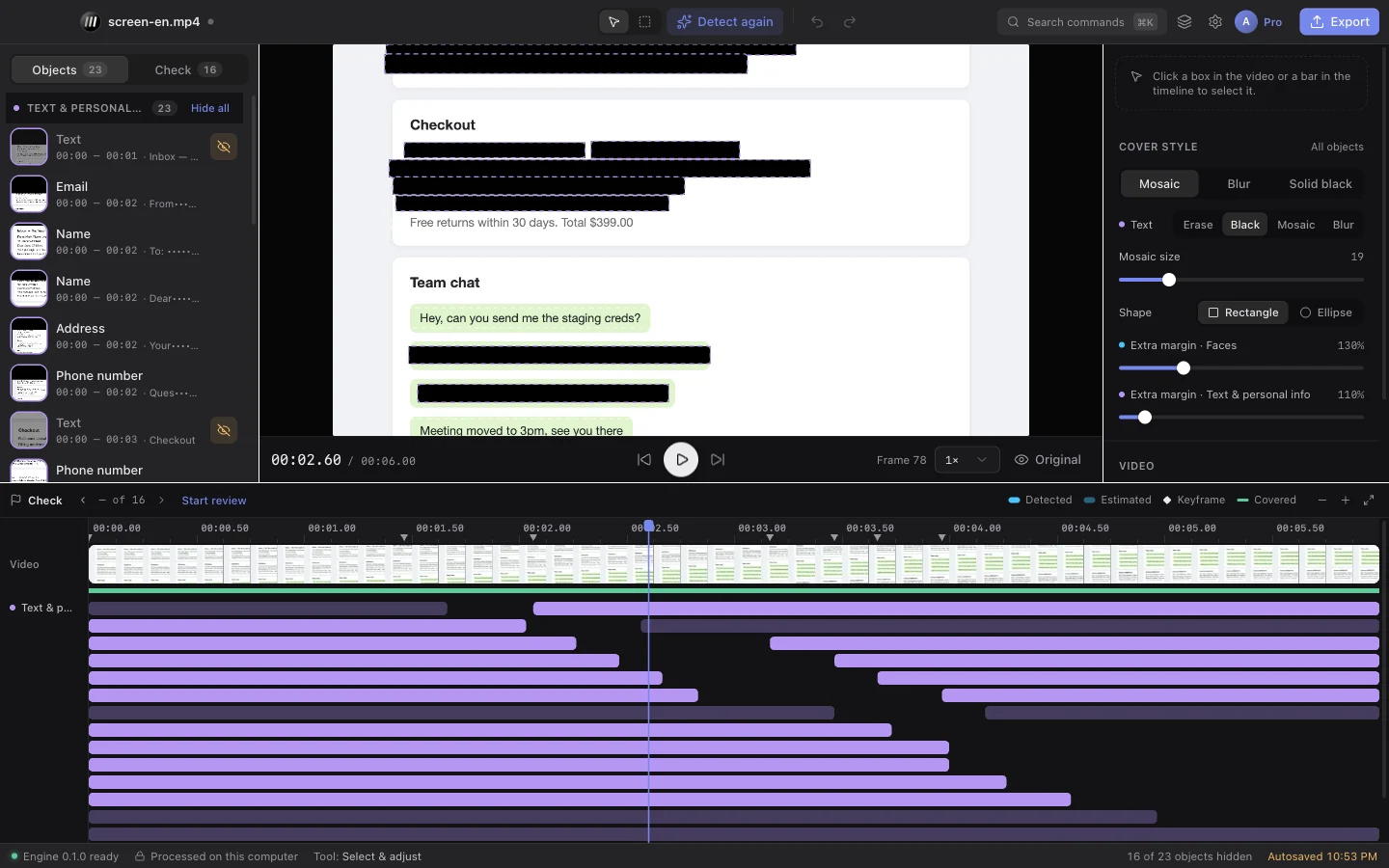
What the app looks for on screen
On-screen text such as names, email addresses, phone numbers, addresses and card numbers is detected in beta. Because text detection is a beta feature, read through the list of what was covered before you share the recording.
For anything else on the screen, such as a logo, a document or a whole window, draw a box and the app follows it forward and backward through the shot.
Use solid covers for text
For text the app recommends solid covers, because blurred text can sometimes be recovered. Mosaic, blur, solid black and erase are all available, as a rectangle or an ellipse; pick a solid one for anything you would not want read.
Check every covered item
Every covered item is one row on the timeline. Step through them, fix a miss with a keyframe, and hide the rows that do not need covering, such as a name that is meant to be visible. With detection in beta, this check is part of the job.
For demos and support videos before they leave the company
The recording is opened from your disk and processed on your computer, and the video is not uploaded. The app goes online only to sign you in and to confirm your plan each time it opens. Export a finished video with the covers burned in, or a transparent overlay or black-and-white matte to place over the original in your editing software.
How to cover personal data in a screen recording
- 01Create a free Beat2Cut account, verify your email and download Beat2Cut Desktop for Mac or Windows.
- 02Open the app, sign in, and open your screen recording from your disk. Nothing is sent anywhere.
- 03Choose on-screen text (beta) as the thing to look for and run detection. Go through the list, add a box for what was missed and remove what should stay visible.
- 04Keep solid covers for text, then export the covered video, or an overlay or matte for your editing software.
Questions
- Is my screen recording uploaded?
- No. Detection, tracking and export all run on your own computer, and the video file stays there. The app contacts Beat2Cut only to sign you in and to confirm your plan each time it opens; once open, it keeps working without a connection for up to 12 hours.
- What kinds of text can it find?
- On-screen text such as names, email addresses, phone numbers, addresses and card numbers, in beta. Anything else can be covered by drawing a box, which the app then follows.
- Why does the app recommend solid covers for text?
- Blurred text can sometimes be recovered, so for text the app recommends solid covers over blur or mosaic.
- How much does it cost?
- Beat2Cut Desktop is free to download with any Beat2Cut account that has a verified email. Using it on your own videos needs Beat2Cut Pro: $20 a month or $120 a year, for up to 3 computers, with no credits spent in the app. Monthly Pro starts with 7 days free (a payment method is needed to start; cancel before the 7 days end and you are not charged). Yearly Pro has no free days.
- How do I try it before paying?
- Download the app, sign in with your Beat2Cut account and open the built-in demo, which works without Pro. To run it on your own video, start monthly Pro: the first 7 days are free, and you can cancel before they end to pay nothing.