Studio-grade multi-language AI narration & voiceover
Transform text scripts into frame-synced timeline narration with human-in-the-loop translation drafts and expressive AI voices. Powered by advanced neural speech models; credit-based.
- Runs entirely in your browser without uploading
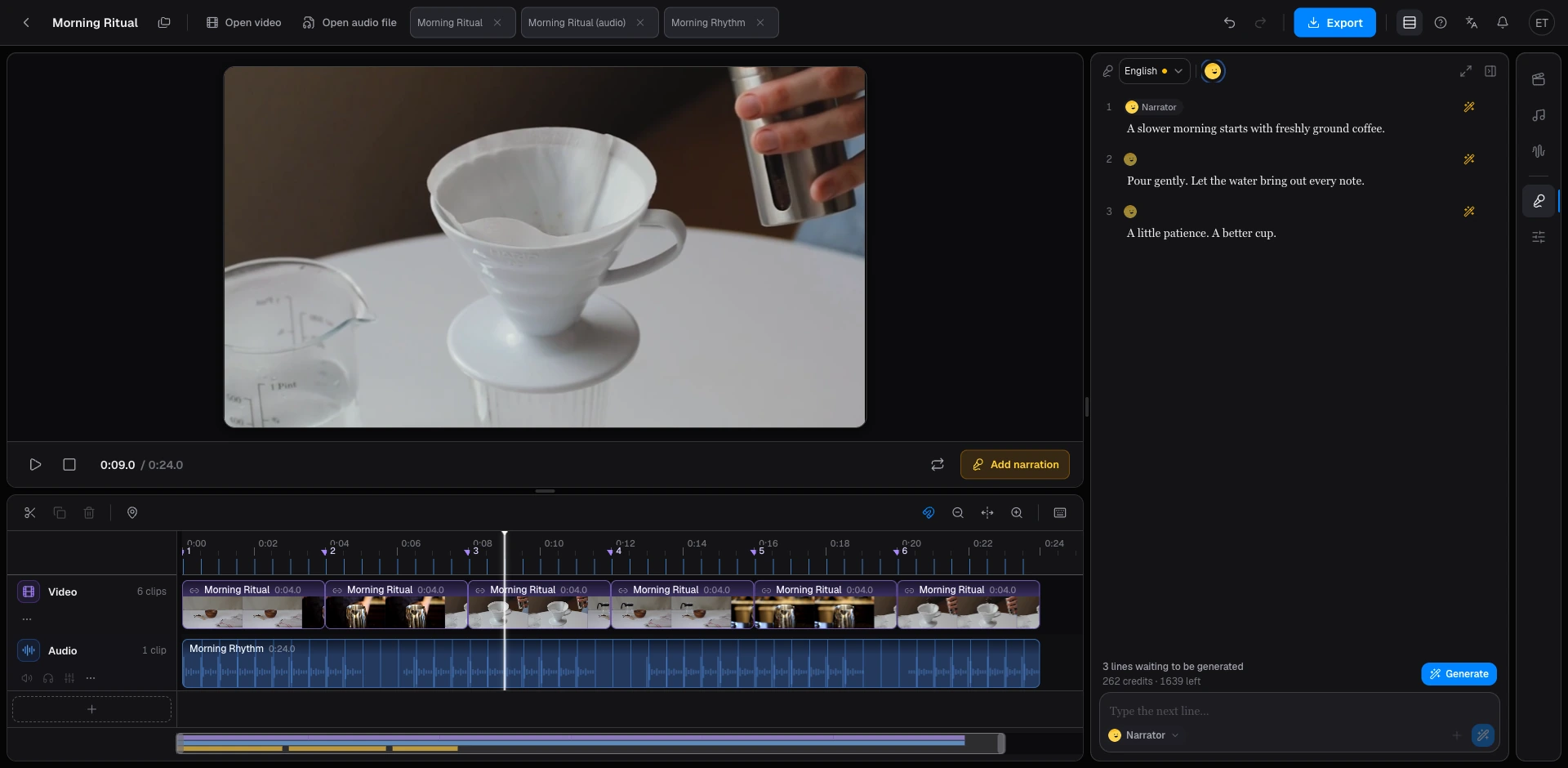
- Studio-grade multi-language neural voices with free daily audition previews.
- Sentence-level clip generation preserves natural vocal cadence, breaths, and pauses directly on the voice track.
- Multi-language versioning workflow: generate editable human-in-the-loop drafts before speech synthesis.
AI voiceover transforms written narrative scripts into expressive, frame-synced spoken audio tracks directly on your multi-track timeline, powered by state-of-the-art neural speech models. Our structured localization pipeline routes source copy through editable translation drafts before triggering multi-lingual voice synthesis. Speech generation and script translation consume compute credits across all tiers, while scene detection, silence removal, and cut-list delivery are included with Pro. Beat detection remains permanently free.
Draft or paste your narrative script directly into the right-hand Script rail, then browse our curated catalog of male, female, and character voice personas. Upon generation, your speech is neatly segmented into sentence-level audio clips placed directly onto the voice track, ready for timeline trimming, volume automation, and smooth picture mixing. We provide complimentary daily audition previews so you can test tone and cadence before committing account credits.
Global multi-language localization represents one of Beat2Cut’s most powerful capabilities. Translate your core narrative script into languages such as English, Spanish, Japanese, and Chinese with a single click. Crucially, the workflow insists on a human-in-the-loop review stage, allowing you to refine proper nouns, brand names, and cultural idioms in an editable draft. This produces genuinely authentic, native-spoken versions of your video rather than generic, robotic machine voiceovers.
Billing mechanics are completely transparent and predictable. Script translation quotes credits based on source character count multiplied by target languages, while text-to-speech synthesis charges based on provider-returned character lengths, clearly quoted before confirmation. Free accounts receive 150 one-time credits at sign-up; Pro subscriptions include a substantial allocation of 10,000 credits per 5-hour window. Rendered MP4 export is priced at 10 credits on Free and is fully included in Pro.
Generated narration audio is securely saved to your project library so you can reopen, review, and export it anytime. If your connection drops or the browser tab is refreshed mid-generation, our recovery workflow restores the task and confirms credit balances cleanly without duplicate charges, ensuring every generated line lands reliably on your timeline.
The production journey is smooth and responsive: sign in, navigate to Studio with the voiceover rail active, paste your narrative text, and audition sample voices. Once satisfied, generate the dialogue take onto your timeline. If distributing content internationally, simply spawn additional language version tracks, polish the translated text, and synthesize distinct native-sounding vocal tracks alongside your primary video.
Beat2Cut voiceover is designed specifically for cinematic narrative storytelling, educational walkthroughs, and social documentary videos, upholding the highest standards of safety and copyright ethics. The platform provides licensed, expressive voiceovers to accompany your visual edits; it does not perform deceptive deepfake lip-syncing or unauthorized voice cloning, ensuring your distributed commercial projects remain fully compliant with major media platforms.
Generating sentence-level audio clips unlocks tremendous post-production flexibility. If a scene requires visual re-timing, you can freely slip individual voice sentences along the timeline ruler without re-rendering the entire script. If a specific line needs rephrasing, re-record that single sentence clip while preserving the rest of your track, saving valuable time and credits. Our mandatory translation review ensures you never spend credits on unvetted, inaccurate translations.
We maintain uncompromising data privacy boundaries. Video decoding, scene analysis, silence stripping, and beat tracking operate entirely locally within your browser, ensuring source footage never touches remote servers. Only your written narration script and target language text are securely transmitted to licensed neural speech partners to synthesize vocal tracks. Complete security practices are detailed in our Privacy Policy.
Generate narration and language versions
- 01Sign in and open Studio with the script rail (?tool=voiceover).
- 02Paste the source script and preview a voice.
- 03Generate the take onto the timeline.
- 04Translate, edit, and generate each extra language as its own take.
Questions
- How do multi-language voiceover versions work?
- Source script → editable translation for each language → separate TTS takes. You can fix the draft before it is spoken.
- What do credits pay for here?
- TTS characters from the provider, and script translation billed by characters × languages. Both are charged on Pro too. Scene detection is 5 credits a run and cut-list delivery with shots is 5 credits, both included with Pro; beat detection stays free.
- Can I edit the translation before it is spoken?
- Yes. The draft is a regular script field. Generate only after names and tone look right.
- How are Beat2Cut voices powered?
- Narration is powered by curated neural AI speech models. The catalog in the Script rail is the live list of available voices.