Export standard NLE interchange formats: FCPXML, Premiere XML, EDL & CSV
Bridge your browser rough cut seamlessly into Final Cut Pro, Premiere Pro, or DaVinci Resolve. Beat cut lists export free; cut lists with shots cost 5 credits per delivery.
- Runs entirely in your browser without uploading
- Free for beat-only cut lists. Lists that include shots cost 5 credits a delivery; Pro delivers without limit.
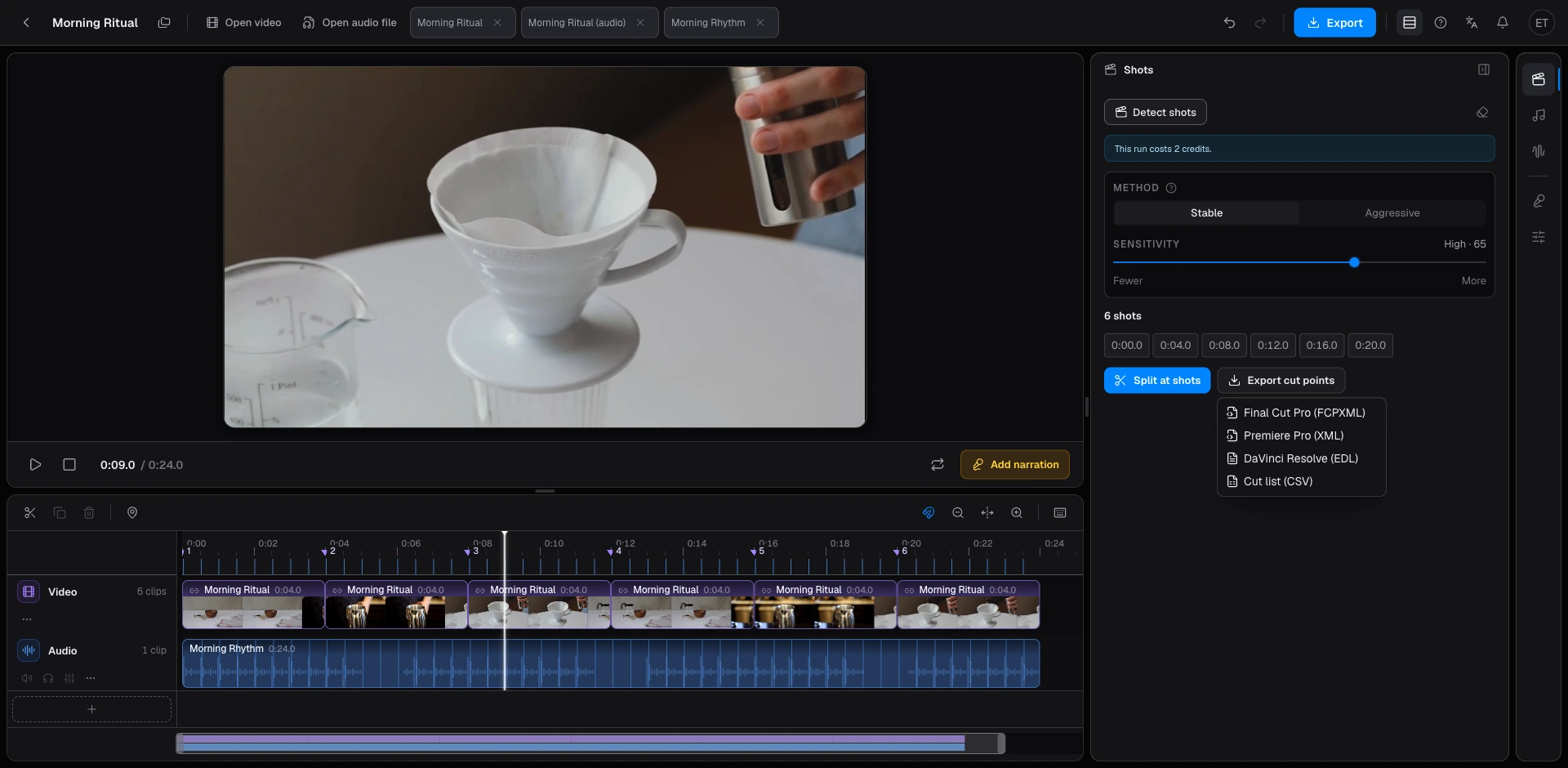
- Universal NLE interchange: export native FCPXML for Final Cut, XML for Premiere, EDL for DaVinci Resolve, or CSV.
- Source-relative timecode mapping guarantees sample-accurate alignment even when clips are shifted.
- Beat cut lists export completely free; shot cut lists cost 5 credits per delivery.
An NLE cut list is a standardized interchange timecode file—not a rendered video master—that transfers your browser rough-cut decisions into major non-linear editing software as native clips or timeline markers. Beat2Cut exports four industry standards from identical detected markers: Apple Final Cut Pro FCPXML, Adobe Premiere Pro XML, DaVinci Resolve EDL, and universal CSV. Cut lists containing only music beats export completely free; lists containing camera scene cuts cost 5 credits on Free accounts and are included with Pro.
Choose your export format based on your downstream finishing application. Apple Final Cut Pro utilizes modern FCPXML to reconstruct clip sequences and project libraries. Adobe Premiere Pro ingests standard sequence XML files. Blackmagic DaVinci Resolve natively imports Edit Decision List (EDL) marker tracks for streamlined color grading and conforming. Tabular CSV files serve production loggers, script supervisors, and spreadsheet budget calculations.
Consolidating all industry exchange standards into a single unified export hub eliminates fragmented toolchains. Regardless of which software your post-production collaborators prefer, our platform formats identical editorial timecodes into their target XML or EDL structure in milliseconds. Our comprehensive format guides provide step-by-step import instructions for every major editing application, bridging browser pre-editing with high-end desktop finishing.
Every exported cut list is directly derived from the scene cuts, rhythmic beat markers, or silence segments you have visually reviewed on your timeline. The export process does not re-analyze source files, ensuring absolute fidelity between your browser review and desktop NLE sequence. Scrub through your cut markers and verify boundary points before exporting to ensure that your destination project opens with flawless, production-ready accuracy.
Leveraging interchange cut lists saves substantial export time, bandwidth, and credits. Rendering a finished MP4 requires intensive browser video re-encoding and audio mixdown, priced at 10 credits on Free accounts. In contrast, delivering a metadata-only cut list takes milliseconds, costing 0 credits for beat-only timelines and just 5 credits when scene cuts are included (unlimited on Pro). If your goal is editing original camera media in Premiere or Resolve, an XML or EDL export is faster and preserves original master quality.
Accessing your cut-point deliverables is straightforward and seamless. After analyzing shots or music beats on the Studio timeline, click the primary Export menu in the upper navigation bar. Cut-list options appear alongside WAV, MP3, and MP4 formats. Select your desired NLE format to instantly download a tidy ZIP archive containing your project interchange file accompanied by software-specific import guidance.
Our DaVinci Resolve EDL export is purpose-built for modern digital grading, finishing, and conforming workflows. It translates detected camera shot changes into native timeline clip events and color markers that Resolve reads natively. Colorists can immediately navigate between scene cuts, conform multi-camera rushes, and apply look-up tables without wasting hours performing manual optical detection inside desktop suites.
Frame arithmetic is rigorously validated against broadcast engineering standards. Timecode rounding discrepancies frequently plague cross-platform interchange, causing insidious single-frame flash holes or drifting audio sync. Beat2Cut derives clip durations from clean, single-pass integer frame boundaries, guaranteeing seamless abutment. The engine correctly factors in complex 29.97 fps NTSC drop-frame rates and source file timecode offsets, ensuring shifted or trimmed clips align perfectly with camera master reels.
Four versatile formats provide tailored solutions for every stage of modern video production. Use CSV for transparent script tracking and client review tables; use FCPXML or Premiere XML to populate structured clip sequences; and use EDL to guide color grading across assembled timelines. One fast browser detection, one visual timeline review, and one friction-free export deliver an uncompromised bridge between browser agility and professional non-linear editing mastery.
Export a cut list for another editor
- 01Detect scenes, beats, or silences and review the list.
- 02Open the export menu on the studio top bar.
- 03Choose FCPXML, Premiere XML, EDL, or CSV.
- 04Unzip the download next to your media, then import the file — the zip also holds a short how-to for your editor.
Questions
- Which format does Final Cut Pro want?
- FCPXML. Import it as a new project or into an existing one; the cuts land as clips or markers depending on how you generated them.
- What does EDL mean on Beat2Cut?
- A marker EDL aimed at DaVinci Resolve, not a classic CMX tape EDL. Use CSV if you only need a table.
- What does a cut-list export cost?
- Beat-only cut lists export completely free. Cut lists that include detected shots cost 5 credits per delivery on Free, and are included with Pro. Scene detection, silence removal, media inspection, AI narration, translation, and MP4 rendering use credits.
- Should I export all four formats every time?
- No. Export the one your next app opens. Four copies of the same cuts do not help search engines or your folder.