Compress video to target MB or exact file size
Compress video to target MB limits for Discord, Gmail, or WhatsApp. 5 credits per export from 100 free each month. Runs in your browser without uploading your media.
- Runs entirely in your browser without uploading
- 5 credits per export, from 100 free credits each month. Sign in required.
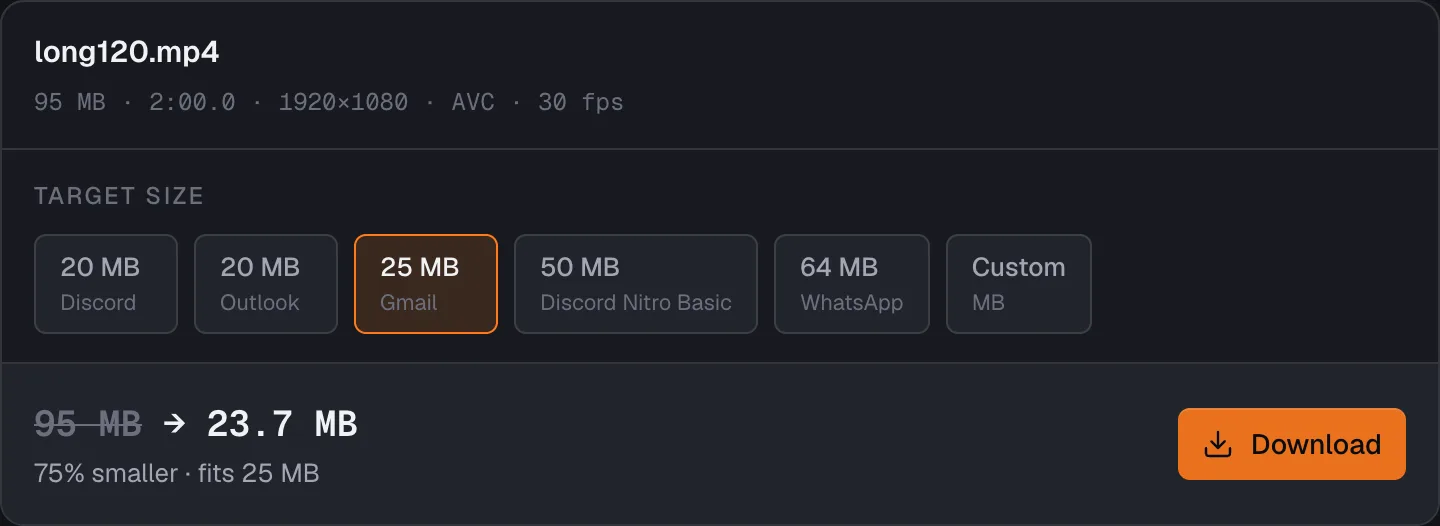
Beat2Cut compresses video to an exact target file size in your browser without uploading your media. Pick preset limits for Discord (20 MB), Outlook (20 MB), Gmail (25 MB), Discord Nitro Basic (50 MB), WhatsApp (64 MB), or enter a custom MB limit. Each export costs 5 credits on a free account, which gets 100 credits a month, and is included with Pro. Output is stored in browser memory, with no cloud queue.
Target bitrate is calculated directly from your target file size and duration, keeping 5% in reserve for the container and encoder overshoot. Audio receives 96 kbps, while the rest goes to video frames. When video bitrate drops too low for the current resolution, the engine automatically downscales to 1080p, 720p, 480p, or 360p so the picture stays clean instead of breaking into blocks.
After encoding, the engine measures actual output size. If the resulting file exceeds your target, it reduces bitrate proportionally and re-encodes, trying up to two additional passes. If your source file is already smaller than the chosen target, it notifies you immediately without wasting time. If the required video bitrate drops below 150 kbps, the tool refuses the job honestly because video quality would collapse into unwatchable artifacts.
Exported videos use standard H.264 video and AAC audio wrapped in an MP4 container with fast-start metadata, enabling instant streaming and playback as soon as the file begins downloading. Pure audio inputs output as M4A. Because encoding and muxing run entirely in your local browser memory, very long 4K files may exceed memory limits on devices with low RAM. A modern Chrome, Edge, Safari, or Firefox browser is required.
Each successful export spends 5 credits from the 100 monthly Free credits, which refill on the 1st of each month and do not roll over. Pro includes every compression. A failed or cancelled job is never charged, and the source file never leaves your computer.
Compress video to a target file size
- 01Open your video file in the compressor.
- 02Select a platform preset like Discord or enter a custom MB limit.
- 03Review the planned video bitrate and resolution, then click Compress.
- 04Download the MP4 once the size check passes.
Questions
- How do I compress a video for Discord?
- Select the 20 MB Discord preset (or 50 MB for Nitro Basic) and open your video. The tool calculates the required bitrate and downscales resolution if needed to prevent compression blur. Your video is encoded locally to an MP4 with fast-start metadata. If your video is already under the target limit, you will see an immediate notice.
- Why does compression downscale my 1080p video to 720p?
- When a file has a strict MB limit and a longer duration, allocating low bitrates to full 1080p frames causes severe pixelation and blocky motion blur. Lowering resolution to 720p or 480p gives each pixel sufficient data, producing a cleaner, sharper picture that comfortably fits your attachment limit.
- What happens if the compressed video is still over the MB limit?
- Video encoders occasionally produce slightly larger files due to complex motion. Beat2Cut measures the actual output immediately after encoding. If the file overshoots your limit, it trims the bitrate and retries up to two more passes. If it still exceeds the target after three attempts, it tells you clearly so you can choose a lower resolution or shorter trim.
- Is video compression free and private?
- Each export uses 5 credits from the 100 free credits you get every month after signing in, so about 20 compressions a month cost nothing. Pro includes them. Encoding runs in browser memory on your device, so the video is never uploaded.
- Preset targets for Discord (20 MB), Outlook (20 MB), Gmail (25 MB), Nitro Basic (50 MB) and WhatsApp (64 MB), or any size in MB.
- Works out the bitrate from your target and drops to 720p or 480p when full resolution would turn to blocks.
- Checks the real file size after encoding and re-encodes lower if it lands over, up to two more times.
Other tools
Detection & Rough Cut
- Silence Remover5 creditsDetect pauses and hesitation gaps across talking-head or podcast footage. Audition candidates and ripple-delete them in one pass with zero upload.
- Scene Detection5 creditsFind hard cuts and scene changes in the browser, review them on the timeline, then split or export a cut list. 5 credits a run from 100 free each month.
- Beat DetectionFree · unlimitedFind beats in a song or a mixed soundtrack in the browser. After a free sign-in, detection and beat-only cut lists never use credits.
Compression & Conversion
Narration & NLE Delivery
- AI VoiceoverTransform text scripts into frame-synced timeline narration with human-in-the-loop translation drafts and expressive AI voices. Powered by advanced neural speech models; credit-based.
- Cut List Export5 creditsBridge your browser rough cut seamlessly into Final Cut Pro, Premiere Pro, or DaVinci Resolve. Beat cut lists export free; cut lists with shots cost 5 credits per delivery.
Media Inspection
- Media Probe2 creditsInstantly inspect media container, video/audio codecs, resolution, frame rate, bitrate, and channel configurations entirely in local browser memory.
- Loudness Check2 creditsQuickly analyze audio peak levels, RMS, and integrated loudness estimates. Ideal for fast local pre-flight checks before podcast and video delivery.
- Contact Sheet2 creditsExtract evenly spaced video frames with overlaid timecodes into a high-res PNG contact sheet. Decoded directly on your device in browser memory.